Skip to content
Best IPTV Player for Firestick in 2026 (Tested & Ranked)
TiviMate is still the safest pick for pure live-TV zapping on a Firestick — but it’s paid, capped at 5 devices, and can’t record on a single-connection plan. mtivi matches its speed, starts free, and adds recording on one connection, translated subtitles, cloud sync and family profiles. Which one is “best” depends on how you actually watch, so this guide ranks five players by real Firestick criteria: remote-first navigation, performance on older low-RAM sticks, recording, and what you get before paying anything.
Last updated: July 2026. Tested on a Fire TV Stick 4K Max, a 2020 Fire TV Stick Lite, and a Fire TV Cube.
The quick comparison
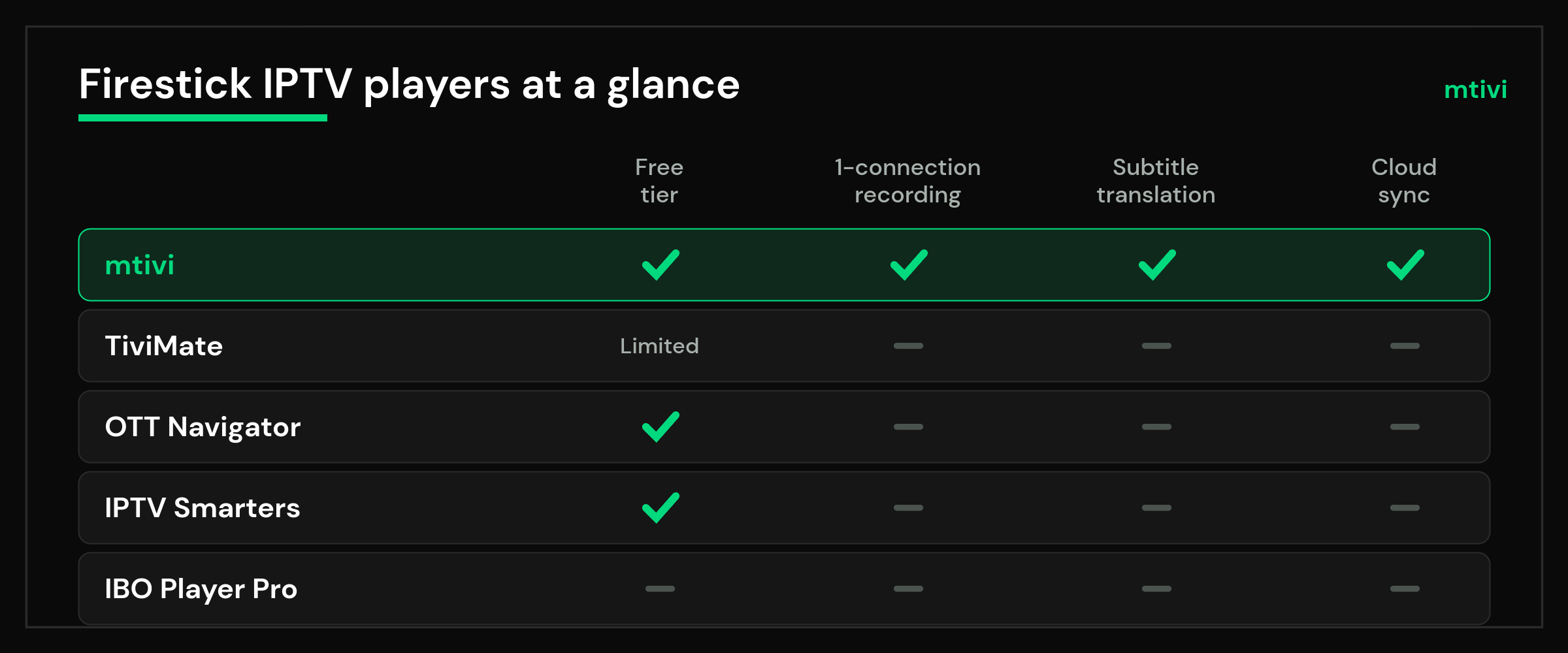
Five apps dominate the “which player should I sideload” conversation on Fire TV forums this year. Here’s how they stack up where it matters:
| Player | Price | Recording | Subtitle translation | Cloud sync | Best for |
|---|---|---|---|---|---|
| mtivi | Free to start; Pro/Max plans | Yes — works even on 1-connection plans | Yes, 55+ languages (Pro) | Yes | One app that does everything, families, multilingual viewers |
| TiviMate | ~$9.99/yr or $33.99 lifetime (Premium) | Premium only; needs a spare connection to record + watch | No | No (local backups) | Pure live-TV browsing with a polished guide |
| OTT Navigator | Free; premium ~$19.99 lifetime | Yes, free | No | No | Tinkerers who want every setting exposed |
| IPTV Smarters Pro | Free with ads | Basic | No | No | Beginners who want the same app on every device |
| IBO Player Pro | One-time device activation fee | No | No | Web portal for playlists | People who manage playlists from a browser |
Competitor prices are what the developers listed at the time of writing and can change; check before you buy.
How we ranked them (what actually matters on a Firestick)
A Firestick is not a phone. Three constraints shape which IPTV player feels good on it:
RAM and CPU. A Fire TV Stick Lite or a 2nd-gen stick has around 1 GB of usable memory. Load a 20,000-channel playlist into an app that parses everything up front and you’ll watch the spinner, then the crash. Apps that lazy-load — fetching channel data as you scroll instead of all at once — are the difference between smooth and unusable on older hardware. Amazon publishes the exact memory and chipset of every stick generation in its Fire TV device specifications, and the gap between a Lite and a 4K Max is bigger than most people assume.
Remote-first navigation. Everything must work with a D-pad and five buttons. Long-press menus, numeric channel entry, and fast channel zapping matter far more than they do on a phone. An app that constantly needs an on-screen keyboard is a bad Firestick app, full stop.
Sideload friction. None of these players sits in Amazon’s Appstore with full features, so you’ll install via the Downloader app. That’s normal on Fire TV — the Fire TV platform is Android-based and allows installing apps from outside the store once you enable it in settings.
We weighted recording, subtitles, sync, and honest free tiers on top of those three. Here’s how each app came out.
1. mtivi — best overall: one app instead of four
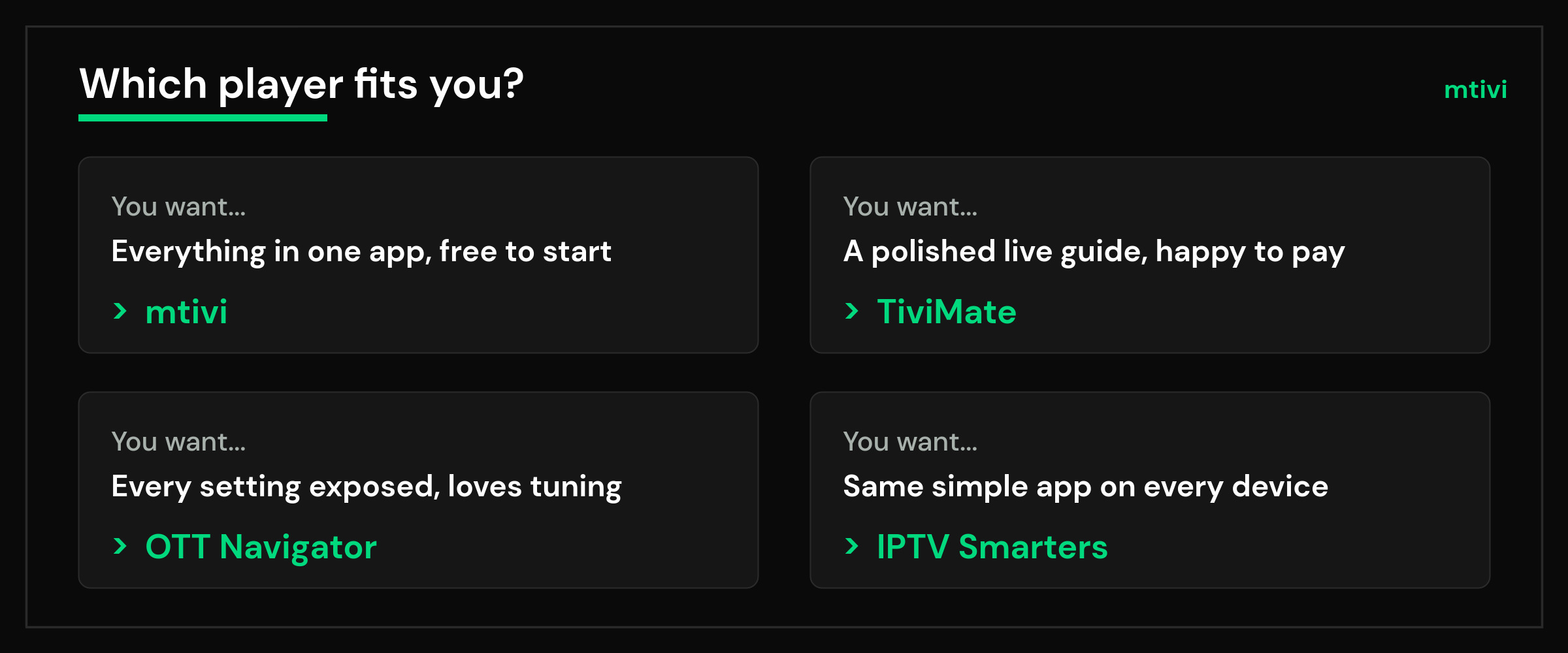
Full disclosure: mtivi is our app, so judge this entry against the specifics, not the ranking. The reason we built it is the reason it tops this list — every other player on this page makes you choose which feature to live without. TiviMate has the guide but no translation and paid recording. OTT Navigator records free but buries you in menus. Smarters runs everywhere but does little deeply. mtivi’s pitch is the whole flagship set in one app: full EPG with catch-up and time-shift, recording, subtitle translation in 55+ languages, cloud sync, Public/Kids/Private profiles with PIN locks, and 4K/HDR playback including Dolby Vision with auto frame rate.
Three things stand out on a Firestick specifically. First, recording works even on a single-connection plan — you can record a channel without killing your live stream, which no other player here manages; the full detail is in our guide to recording IPTV on a single-connection plan. Second, large playlists stay smooth: mtivi lazy-loads, so an 80,000-channel list scrolls cleanly even on a Stick Lite where other apps choke. Third, translated subtitles (a Pro feature) mean the household can watch channels in languages they don’t speak — nothing else on Fire TV does this.
The honest trade-offs: mtivi runs on Android devices today — Firestick, Android/Google TV, phones, tablets, boxes — with iPhone, iPad, Mac, Apple TV, Windows and smart-TV apps still on the roadmap, so a household with an iPhone can’t get the native-app experience there yet. And while the Free tier is a complete player (live TV, movies, series, EPG, favorites, profiles, parental controls, instant recording, up to 2 playlists), the headline features — subtitle translation, scheduled recordings, multi-view, offline downloads — sit in Pro. Free to start, no subscription needed: grab it from the download page, from Google Play, or via Downloader code 1706057 on Fire TV.
2. TiviMate — best pure live-TV guide (if you’ll pay)
TiviMate earned its reputation. The EPG grid is fast and information-dense, channel switching is nearly instant, and the whole interface was clearly designed for a remote from day one. If your IPTV life is “open the guide, zap between live channels, done,” TiviMate Premium remains excellent on a 4K Max.
The catches are well known by now. The free version is close to a demo — one playlist, no recording, no favorites worth using — so budget for Premium at roughly $9.99/year or $33.99 lifetime. Premium is capped at 5 devices, which sounds like plenty until a family with two sticks, two phones and a tablet hits the wall. Recording requires a spare connection on your plan: on a single-connection subscription, recording one channel while watching another simply isn’t possible in TiviMate. There’s no cloud sync (backups are manual files), no subtitle translation, and no iOS version at all. On a Stick Lite it runs acceptably with mid-sized playlists but gets sluggish past ~10,000 channels in our testing.
3. OTT Navigator — best for tinkerers
OTT Navigator is what happens when a developer says yes to every settings request. Custom layouts, multiple EPG sources, granular sorting, per-category views — nothing else is this configurable, and recording is free, which is genuinely rare. The premium unlock (about $19.99 lifetime) mostly buys cosmetics and convenience.
The cost is complexity. The settings tree is deep enough that Fire TV forums are full of “how do I undo what I just did” threads, and the default look is dated until you invest an evening tuning it. On low-RAM sticks it handles big playlists better than TiviMate but not as smoothly as a lazy-loading player. No sync, no translation, Android only. If you enjoy the tuning as much as the watching, this is your app.
4. IPTV Smarters Pro — best for beginners on mixed devices
Smarters is the app your less-technical relative can operate. Setup is a simple login form (it’s especially friendly to Xtream Codes logins), the layout is touch-and-remote friendly, and versions exist for nearly every platform, so the same app can run on the Firestick, an old tablet, and a phone. For a first IPTV setup it’s a fine on-ramp.
It’s also the shallowest player here. The free version carries ads, the EPG is serviceable rather than fast, recording is basic, and there’s no sync between all those devices — each one is set up and maintained separately. Power features like flexible guide layouts or serious recording rules aren’t the point. People tend to start on Smarters and graduate elsewhere within a year.
5. IBO Player Pro — fine if you like web-managed playlists
IBO Player Pro does one thing differently: playlists are managed from a web portal tied to your device, so you upload the playlist in a browser instead of typing URLs with a remote. Some people love that workflow. The player itself is competent for live TV and simple to hand to a family member.
The activation model is the weak point. The app is tied to your device via a one-time activation fee, and when the activation or portal hiccups you can be stuck on a loading screen with nothing to click — a failure mode Fire TV forums know well. No recording, no sync to other devices beyond the portal, no translation. It ranks fifth because the others fail more gracefully.
Which Firestick you own changes the answer
“Best IPTV player for Firestick” is really several questions, because the sticks are not one device. Three hardware facts decide what a player can comfortably do on yours, and they matter more than any feature list.
Memory decides how big a playlist stays smooth. The Fire TV Stick 4K and 4K Max carry 2GB of RAM; the HD and Lite sticks carry 1GB. On a 1GB stick a very large playlist is the thing that pushes an app into stutter or a restart, so a player that loads channels progressively rather than all at once is not a nice-to-have — it is the difference between usable and not. On a 2GB stick you have real headroom and can pick on features instead.
Storage decides whether recording is realistic. The 4K Max ships with 16GB, of which roughly 12GB is actually available to you; the 4K, HD and Lite sticks ship with 8GB, and a good chunk of that is gone before you install anything. Recording live TV to a stick with a couple of spare gigabytes fills it fast, and a full drive is the most common reason a recording stops part-way. If recording matters to you, the 4K Max is the only stick where it is comfortable without external storage.
Wi-Fi generation decides stability in a busy house. The 4K Max supports Wi-Fi 6E, the 4K supports Wi-Fi 6, and the cheaper sticks do not. This rarely changes which player is best, but it does change whether buffering is the app’s fault. Before blaming a player on an older stick in a flat full of devices, rule out the network.
The short version: on a 4K Max, choose on features and interface. On a 4K, choose on features but keep an eye on storage if you record. On an HD or Lite, choose the player that handles a large playlist most gracefully and expect to skip recording entirely. Picking a player without knowing which stick is under the TV is how people end up blaming an app for a hardware ceiling.
Which player for an older or low-RAM Firestick?
This is the question the big listicles skip, and it changes the answer. On a Fire TV Stick 4K Max (2 GB RAM), every app on this list runs well and the ranking above is the ranking. On a Stick Lite, a 2nd-gen stick, or any stick that’s been in a hot cabinet for five years, two rules apply:
First, playlist size beats app choice. A 5,000-channel list runs fine almost anywhere; an 80,000-channel list separates the lazy-loaders from everything else. mtivi stays smooth because it never parses the whole list up front; TiviMate and Smarters visibly slow down; OTT Navigator lands in between.
Second, free up memory before blaming the app. Fire OS keeps recently used apps resident, and on a 1 GB stick that leaves little for a channel guide. Force-stopping unused apps (Settings → Applications → Manage Installed Applications) before a long session makes a real difference — it’s the single most effective fix we know for “my player got slow,” on any of these apps.
The best free IPTV player for Firestick
Most people asking this are really asking two different questions at once, and separating them saves a lot of wasted downloads. “Free player” means the app costs nothing to install and use. It does not mean free channels, movies or series — every player on this page is an empty shell until you add a playlist you already have. If you arrived looking for the second thing, no app on any list will provide it.
On the first question, the honest answer is that free tiers differ enormously, and the differences only show up after you have already set everything up.
- Free with no time limit, no account, and the core playback intact. This is what you want. mtivi sits here: install it, add your playlist, and watch, with no sign-up step and no countdown. Subtitle translation, the wider device sync and the heavier extras are what Pro and Max add; playing your playlist properly is not held back.
- Free trial that expires. Common, and fine if you intend to pay. The trap is only noticing on day eight, after you have built your favorites and tuned your guide, at which point switching costs you that work.
- Free but ad-supported. Workable on a phone, genuinely unpleasant on a TV, where an interstitial between channel changes is exactly the friction you bought a stick to avoid.
- Free but crippled. The one to avoid: a playlist size cap, a single-playlist limit, or recording and guide features locked behind a purchase you cannot evaluate until you have paid.
The practical test is to ask what happens to your setup if you never pay. If the answer is “it keeps working exactly as it does now”, the free tier is real. If the answer is “it stops” or “it degrades”, you are on a trial, and you should decide up front whether the paid tier is worth it rather than discovering the bill after you have invested an evening in configuration.
One thing worth knowing on a Firestick specifically: a free player that has to re-download your playlist on every launch will feel slower on a stick than the same app on a phone, because the stick has less memory to hold it. If you are comparing free options on an older stick, judge them on cold-start time with your actual playlist loaded, not on how they feel in a demo with twenty channels.
Do you actually need to pay?
Honest answer: for casual watching, no. OTT Navigator free and mtivi Free are both complete players — mtivi’s Free tier includes live TV with the full guide, movies and series, favorites, profiles with parental controls, instant recording and up to 2 playlists, with no subscription required. Smarters is free if you tolerate ads.
Paying starts to make sense at specific trigger points: you want scheduled or recurring recordings (mtivi Pro/Max, TiviMate Premium), subtitles translated into your language (mtivi Pro, nobody else), multi-view for live sports (mtivi Pro), or TiviMate’s guide polish (Premium, always). If you’re not hitting one of those, keep your money.
Installing your pick on a Firestick
All five install the same way: enable “Install unknown apps” for the Downloader app in your Fire TV’s developer settings, open Downloader, and enter the app’s URL or code. For mtivi, enter code 1706057 and the APK installs directly — the download page has the details, and the same APK covers Android TV, Google TV and Android phones. Then add your own playlist (M3U, M3U8 or Xtream Codes) and you’re watching in a couple of minutes.
Worth repeating as you shop for any of these apps: the player is legal software with no channels inside. What you load into it is your responsibility, so stick to sources you have the right to use.
Frequently asked questions
What is the best IPTV player for Firestick in 2026?
It depends on what you value. mtivi leads for an all-in-one experience – live TV, a full guide, recording, subtitle translation and cloud sync in one app – while TiviMate, IBO Player and others each do parts of it well. All are players; you bring your own playlist.
How do I install an IPTV player on a Firestick?
Open the Downloader app on your Firestick, enter code 1706057 for mtivi, and install the APK. Then add your M3U or Xtream Codes playlist and you are set.
Is mtivi free on Firestick?
Yes, mtivi is free to start on Fire TV and Firestick with no subscription needed. Optional Pro and Max plans add features like subtitle translation and scheduled recording.
Do IPTV players come with channels?
No. Every player on Firestick, mtivi included, is an empty app. You add your own playlist or subscription; the player just plays it.
Which Firestick models does mtivi support?
mtivi runs on current Fire TV Sticks including 4K and 4K Max, plus Fire TV devices, Android TV, Google TV and Nvidia Shield.
Why is my player buffering on Firestick?
Usually Wi-Fi signal, an overloaded older Stick, or the provider server. Move closer to the router or use 5 GHz, close background apps, and raise the buffer. A 4K Max handles heavy playlists better than older Sticks.
Do I need an mtivi subscription to use it on Firestick?
No. mtivi is a player, not a service – it has a free tier and never sells channels. You only pay your own content provider, and optionally mtivi Pro or Max for extra features.
Can I use a mouse or just the Firestick remote?
mtivi is built remote-first for the Firestick D-pad, and also supports a Bluetooth mouse or air-remote if you prefer.
How much storage does an IPTV player need on Firestick?
The app itself is small. Recording is what uses space, so record to a USB drive on Fire TV devices that support it, or keep recordings short on a base Stick.
Will an IPTV player slow down my Firestick?
A well-built player will not. Keep the Stick updated, avoid running many apps at once, and pick a player that handles large playlists efficiently – very large lists are where cheap apps stutter.
What is the best free IPTV player for Firestick?
Look for a free tier with no time limit, no forced account, and core playback left intact. mtivi fits that: install it, add your own playlist and watch, with subtitle translation and the wider sync features reserved for Pro and Max. The useful test for any app is what happens if you never pay. If your setup keeps working unchanged, the free tier is genuine; if it expires or degrades, it is a trial and you should decide about paying before you invest an evening in configuration.
Which IPTV player is best for a Fire TV Stick 4K Max?
On a 4K Max you have 2GB of RAM and about 12GB of usable storage, which is enough headroom that no mainstream player will struggle. That means you can choose on interface and features rather than on performance. It is also the only stick where recording to internal storage is comfortable without adding external storage.
Will an IPTV player work on an older Fire TV Stick HD or Lite?
Yes, but with 1GB of RAM a very large playlist is what pushes those sticks into stuttering or restarting. Choose a player that loads channels progressively instead of all at once, keep your playlist trimmed to what you actually watch, and plan to skip recording, since 8GB of shared storage fills up quickly.
Does a free IPTV player come with channels?
No. mtivi is a media player. We do not provide, sell or include any channels, movies, series or playlists — you add your own source. That is true of every player on this page: they are empty until you supply a playlist you already have, and a free app has no bearing on where that playlist comes from.