Skip to content

Best IPTV Player for Low-End Android Boxes (2GB RAM)
The best IPTV player for low-end Android boxes is whichever one opens your playlist fastest and keeps the guide scrolling without stalling. On a 2GB box that rules out the heaviest, most customizable apps and rewards the ones that stay responsive under a big list. mtivi is our pick for most cheap boxes because it holds up on modest hardware, starts free, and does not need an account before you can test it.
Almost every “best IPTV app” list is written on a flagship box. That is not what most people own. The sub-$40 Android box on the back of the TV, the four-year-old stick, the 2GB box that came bundled with a subscription — those are the machines that actually struggle, and they struggle in specific, predictable ways. This guide compares the main players on that hardware, then gives you the settings that buy back the most speed.
What “2GB of RAM” really gives you
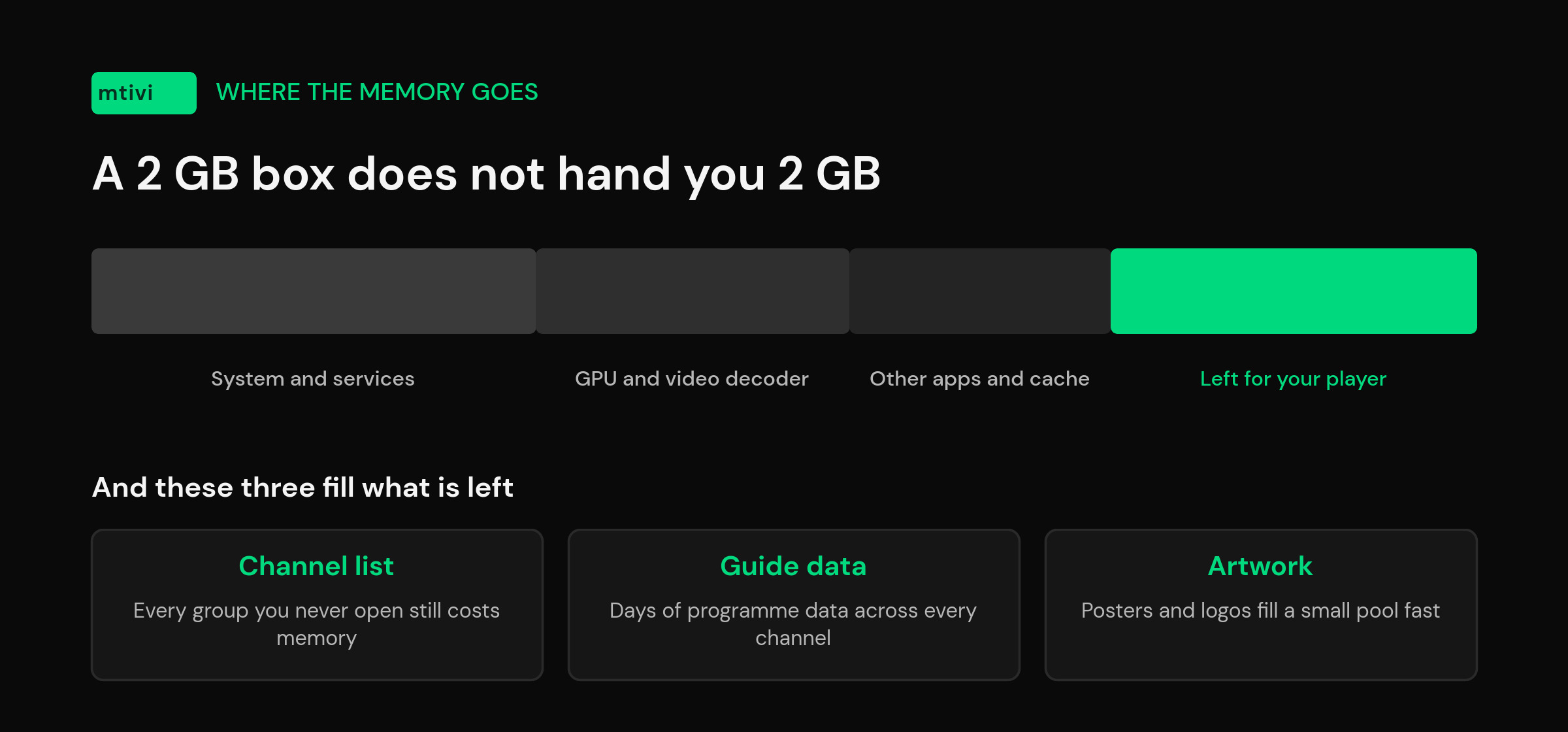
You never get 2GB. The GPU, the video decoder and the operating system all reserve memory before your apps see any of it, so the pool an IPTV player can actually use on a 2GB box is meaningfully smaller than the number on the packaging. Android itself treats memory as a shared, contested resource and will kill background apps to keep the foreground one alive — which is why your player sometimes “restarts” when you come back to it from the launcher. Google documents this behavior in its memory allocation guide, and it publishes a separate set of memory rules specifically for TV apps, because television hardware has always been tighter than phone hardware.
Android also has a formal low-memory flag that developers can read at runtime, and the threshold for it sits around 1GB. A 2GB box is therefore not officially “low RAM” — it just behaves like it once you point 20,000 channels at it. That gap between the spec sheet and real use is the whole problem.
The three things that actually make a player crawl
Cheap boxes are not equally bad at everything. They decode video perfectly well — a 2GB box will play a 1080p channel all evening without complaint. What breaks is everything around the video.
Parsing the playlist. A big M3U or a large Xtream account has to be read, sorted and held somewhere. A player that keeps the whole list expanded in memory will feel fine on 5,000 channels and hopeless on 40,000. This is the single biggest difference between apps on the same box.
Holding the guide. The electronic program guide is far larger than the channel list — days of program data across every channel. Players that load the entire guide up front will take minutes on a cheap box, or run out of memory and close. Players that fetch it in slices feel instant.
Artwork. Posters and channel logos are images, and images are the fastest way to fill a small memory pool. A VOD section that tries to render a wall of high-resolution artwork will stutter on a box that plays 4K video fine. That contradiction confuses people constantly: the video is smooth, the menu is not.
Once you see those three, the pattern in the community complaints makes sense. “It feels like it is running on an old computer” almost never means the box cannot decode the picture. It means the list, the guide or the artwork is too heavy for the memory left over.
The best IPTV players for a low-end Android box in 2026
All of these are media players. You bring your own playlist or Xtream login and the app plays it; none of them supply channels. Here is how they behave specifically on cheap, low-memory hardware.
| Player | On a 2GB box | Watch out for |
|---|---|---|
| mtivi | Stays responsive on very large playlists; hide dead channels and clean up names to shrink what the box has to draw | Android devices today; Apple and Windows apps are on the roadmap, not out yet |
| TiviMate | Long-standing favorite with a polished guide; fine on a mid-size list | The features most people want sit behind Premium, which caps you at five devices |
| OTT Navigator | Deeply configurable, so you can strip the interface back to something light | You have to know which settings to turn off; defaults are not tuned for cheap hardware |
| IPTV Smarters Pro | Simple layout, easy first setup, modest demands | Basic guide and thinner features; you outgrow it rather than break it |
| IBO Player Pro | Very light interface, popular on budget boxes and TVs | Activation is tied to the device and, per its own FAQ, cannot be transferred to another one |
That last row matters more on cheap hardware than anywhere else, because cheap boxes are the ones that die. If your activation is welded to a box that costs less than a takeaway, replacing the box means paying again and rebuilding the setup by hand. It is worth reading how that model behaves when the app gets stuck before you commit to it.
Why mtivi holds up on modest hardware
mtivi was built around large playlists rather than despite them, so the parts that usually choke a cheap box are the parts it is designed for. You can hide dead channels and reorder groups so the box is not rendering thousands of entries you will never open, and strip the [HD] and |UHD| tags that make lists harder to scan. Both cut real work off the device, not just clutter off the screen.
The other thing that matters on budget hardware is what happens when the box gives up. Cheap boxes reboot, factory-reset and get replaced. Cloud sync means the setup you spent an evening arranging is not stored only on the thing most likely to fail — it comes back on the next device instead of being rebuilt from memory. That is a bigger deal than any frame-rate setting.
mtivi is free to start and does not ask for an account first, so testing it costs you the download and ten minutes. Subtitle translation across 55+ languages sits on the Pro tier, and there is a Max tier above that; the core player, the guide and playlist management are on the free tier. If you want the wider picture of what a player should do on a television rather than a phone, our Android TV and Google TV comparison covers the same field on better hardware, and the Firestick guide covers the other device most people are running this on.
Settings that buy back the most speed
Before you blame the app, work through these in order. On a 2GB box the first two usually do more than everything else combined.
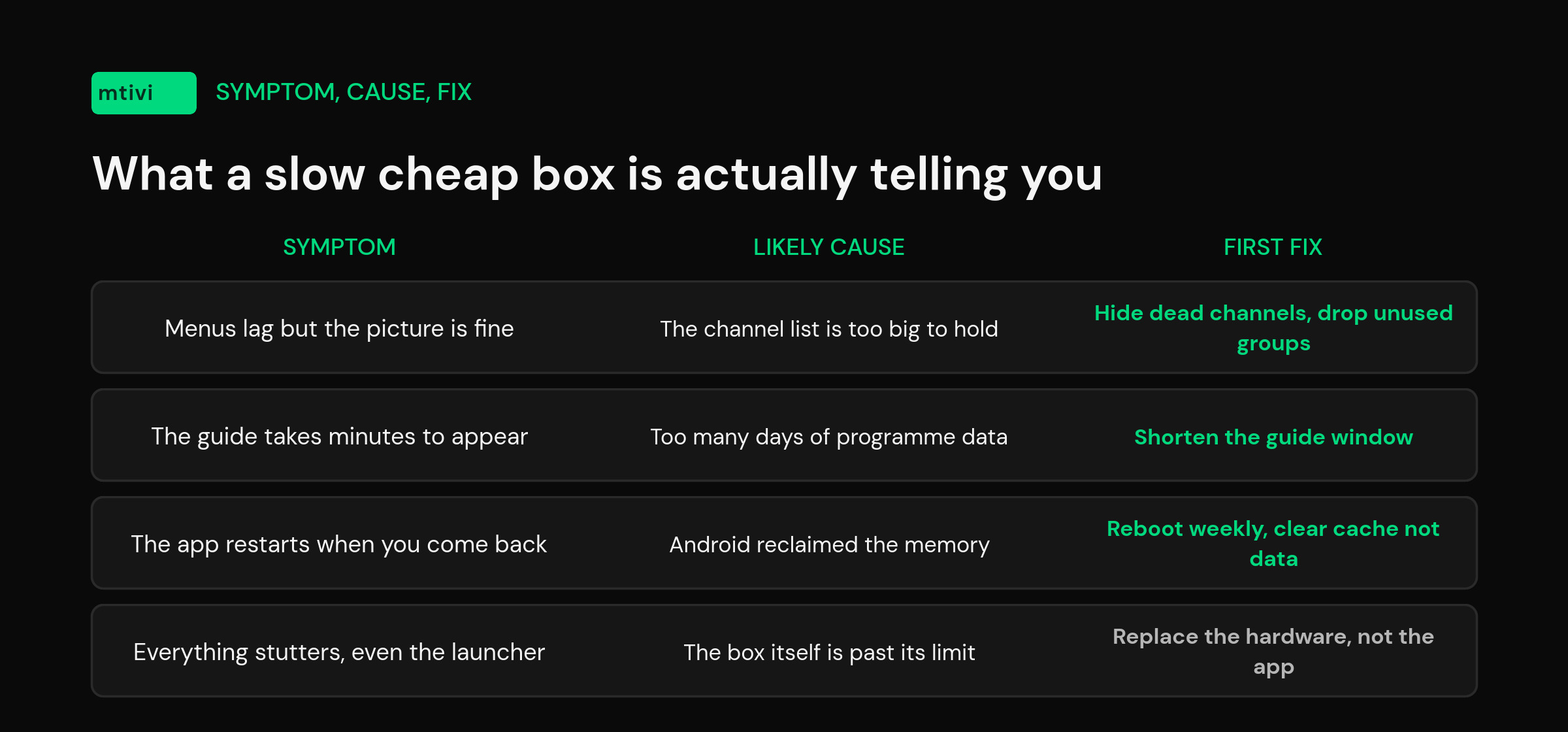
- Cut the playlist down. Remove the groups you never watch — foreign-language bouquets, duplicate quality variants, adult categories. A list you actually use is a fraction of the size of the one your source hands you.
- Hide dead channels. Entries that no longer respond still cost the box memory and still make you scroll past them. Clearing them is the cheapest performance win there is.
- Turn off VOD artwork if you do not use VOD. If you only watch live TV, the movie posters are pure overhead.
- Use Ethernet, or move the box. Wi-Fi on a cheap box is usually its weakest component. A £5 cable frequently outperforms a router upgrade.
- Reduce the guide window. Fewer days of program data means far less to hold and redraw.
- Clear the app cache monthly. Settings, then Apps, then your player, then Clear cache — not Clear data, which wipes your setup.
- Reboot weekly. Unglamorous, effective. Cheap boxes leak memory over days of uptime.
If buffering is your main symptom rather than sluggish menus, the cause is usually elsewhere in the chain — our guide to buffering that starts after an app update walks through separating a network problem from an app problem.
When the box is the problem, not the app
There is a floor, and no player gets under it. If your box shipped with 1GB of RAM, if it is running an Android version from five or six years ago, or if the launcher itself takes ten seconds to respond before you have opened anything, you are not going to fix that with settings. At that point the honest advice is to spend on hardware rather than software: a current budget streaming device with 2GB and a modern chip will feel dramatically faster than a 1GB box with the perfect app on it.
The other floor is the source. A player cannot invent bandwidth, and a channel that stutters on every device at 8pm is not a memory problem. Android TV boxes vary enormously in build quality, but they all fail the same way when the connection upstream is the bottleneck. Test one channel on a phone over mobile data; if it stutters there too, the box is innocent.
Related guides
- Best IPTV Player for Large Playlists (10,000+ Channels)
- How to Load 10,000+ Channels Without Lag
- Best IPTV Player for Android TV and Google TV
- What Is an IPTV Player? A Clear Guide
- M3U vs Xtream Codes: Which Format Should You Use?
Frequently asked questions
What is the best IPTV player for a low-end Android box?
For most cheap boxes, mtivi. It is built around large playlists, lets you hide dead channels and clean up names so the box draws less, and it is free to start with no account needed. IPTV Smarters Pro is the simplest lightweight alternative if you only want live TV and a basic guide.
Is 2GB of RAM enough for an IPTV player?
Yes for playback, usually yes for menus, and it depends for very large playlists. A 2GB box will decode 1080p live TV all evening. Where it struggles is holding a huge channel list, days of guide data and a wall of VOD artwork at the same time. Trim the list and it is comfortable.
Why is my IPTV app so slow on a cheap Android box?
Almost always the channel list, the guide or the artwork rather than the video. Cut the playlist to the groups you watch, hide dead channels, shorten the guide window and clear the app cache. If the launcher itself is slow before you open anything, the box is the limit.
Does a lightweight IPTV player mean fewer features?
Not necessarily. Feeling light on a cheap box is about what the app loads into memory and when, not about how short the feature list is. A player can offer a full guide, recording and subtitle tools and still stay responsive if it does not try to hold everything at once.
How many channels can a 2GB Android box handle?
There is no fixed number, because it depends on how the player stores the list and how much guide data comes with it. Plenty of people run tens of thousands of channels on modest boxes without trouble; the ones who struggle usually have every group enabled and the maximum guide window set.
Should I use Wi-Fi or Ethernet on a cheap box?
Ethernet, every time, if you can reach it. The wireless chip is one of the first things manufacturers economise on, and a cheap box on the far side of the house is a common cause of buffering that gets blamed on the app or the source.
Does mtivi provide any channels or playlists?
No. mtivi is a media player. We don’t provide, sell, or include any channels, movies, series, or playlists. You add your own source — an M3U link or Xtream Codes login — and mtivi plays it.
Will clearing the cache delete my playlists and favorites?
Clearing the cache will not. Clearing data will. They sit next to each other in Android’s app settings and people tap the wrong one constantly. If your setup is synced to the cloud it comes back either way, which is the main reason to turn sync on before you start troubleshooting.
Does Widevine L1 matter for an IPTV player?
Not for your own playlist. Widevine levels affect subscription streaming apps that enforce DRM, which is why cheap boxes cap those services at lower resolutions. Playing an M3U or Xtream source through a media player is not subject to that.
Is it worth buying a better box instead?
If yours has 1GB of RAM or an Android version from five or six years ago, yes. Below that floor no player will feel good. Above it, settings and playlist hygiene get you most of the way, and the money is better spent on a stable connection.
Can I move my setup if the cheap box dies?
With mtivi, yes — cloud sync restores your playlists, favorites and layout on the next device. Some players tie activation to a single device and do not allow transfers, which is worth checking before you buy anything on hardware you expect to replace.
Do I need to pay to test a player on my box?
Not with mtivi — the free tier includes the player, the guide and playlist management, and there is no account required to try it. Subtitle translation across 55+ languages sits on the Pro tier. Testing on your own hardware is the only benchmark that matters, since two boxes with the same RAM figure can behave very differently.