Skip to content

Best IPTV Player for Nvidia Shield TV and Shield Pro (2026)
The best IPTV player for Nvidia Shield is the one that uses the hardware you actually paid for: gigabit Ethernet, a decoder that handles 4K60 HEVC without breaking a sweat, and — on the Pro — 3GB of RAM and two USB 3.0 ports. mtivi is our pick because it loads very large playlists without stalling, records on plans that only allow one connection, and starts free with no account. TiviMate remains the polished alternative if you mainly want a guide and do not mind its Premium limits.
Search “best IPTV for Nvidia Shield” and you get pages of subscription ads wearing a player guide as a costume. That is not this. The Shield is a nine-year-old product line that Nvidia is still patching, and it has a very specific shape: excellent at some things, quietly incapable at others. Knowing which is which tells you what to install and what to stop blaming the app for.
What the Shield actually gives an IPTV player
Both 2019 Shields run the Tegra X1+ with a 256-core GPU. That chip hardware-decodes H.264, VP9 and H.265/HEVC up to 4K at 60fps, and the box outputs HDR10, HLG and Dolby Vision over HDMI 2.0b with Dolby Atmos passthrough. For live TV that is more headroom than almost any playlist will ever ask for. A 1080p channel barely wakes it up.
Two absences matter, and no player can code around them. There is no AV1 hardware decode on Tegra X1+, and there is no HDMI 2.1 — so no 4K120, and no variable refresh rate. AV1 is still rare in live IPTV playlists, but it is spreading through on-demand libraries, and when a Shield meets an AV1 file it either falls back to software decoding or gives up. If a single VOD title stutters while every channel is flawless, the codec is the first thing to check, not the player.
Software-wise the Shield sits on Android 11 under SHIELD Experience, and Nvidia is still shipping updates: SHIELD Experience 9.2.4 landed with January 2026 security patches. That is remarkable longevity for a streamer released in 2019, and it means current Android TV players install and run normally rather than fighting an abandoned OS.
Tube or Pro? The difference decides your player
People say “Shield” as if it is one device. It is two, and for IPTV they are not close.
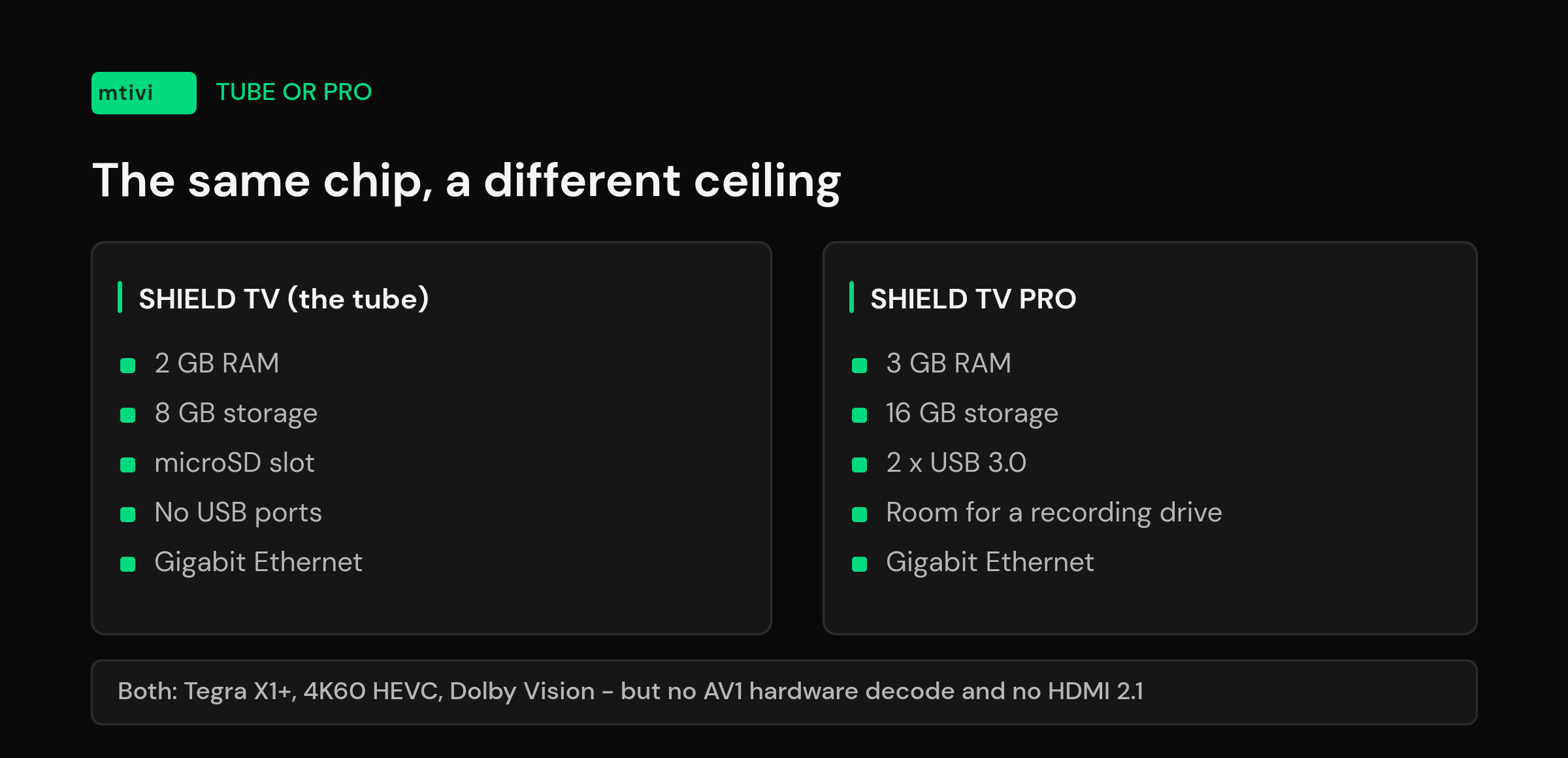
The cylinder — the 2019 Shield TV, what everyone calls the tube — has 2GB of RAM, 8GB of storage and a microSD slot. No USB ports. The Shield TV Pro has 3GB of RAM, 16GB of storage and two USB 3.0 ports.
That extra gigabyte is the whole ballgame on a big list. A playlist in the tens of thousands of channels, plus several days of guide data, plus VOD artwork, is a memory problem long before it is a CPU problem. On the tube a huge list will load — it just spends longer doing it, and Android is more willing to kill the player in the background and hand you a cold restart when you come back from the launcher. On the Pro the same list settles in and stays there.
The USB ports decide recording. Any player that writes recordings to external storage needs somewhere to write, and 16GB of internal space fills up in a couple of films. Plug a cheap USB 3.0 drive into a Pro and DVR becomes practical instead of theoretical. On the tube you are limited to a microSD card, which works but is slower and smaller. If recording is the reason you bought a Shield, buy the Pro.
Both models have gigabit Ethernet, and you should use it. Wi-Fi is where most “the Shield is buffering” threads actually end.
The best IPTV players for Nvidia Shield in 2026
All of these are Android TV apps and all of them will install on either Shield. They differ in what they do when the list gets big and when something goes wrong.
| Player | Best for | Watch out for |
|---|---|---|
| mtivi | Very large playlists, recording on one-connection plans, subtitle translation, cloud sync across devices | Android devices today; Apple and Windows apps are on the roadmap, not out yet |
| TiviMate | The most cable-like guide on Android TV; long-standing Shield favorite | Recording and multiple playlists sit behind Premium, which caps you at five devices |
| OTT Navigator | People who want to tune every last setting themselves | A dense settings tree; expect an evening of configuration before it feels right |
| IPTV Smarters Pro | The simplest way to get an Xtream login playing | Frequently rebranded by resellers, so the build you get varies; basic guide handling |
| XCIPTV | Xtream accounts with catch-up and a multi-screen layout | Also commonly white-labeled; support depends on whoever shipped your version |
If you want one sentence: install mtivi first, and try TiviMate if you specifically want its guide layout. Everything else on that list is a fallback rather than a first choice on hardware this capable.
Why mtivi is our pick on Shield hardware
The Shield’s strengths are large-list handling and steady playback. Those are exactly the things mtivi was built around.
Playlists in the tens of thousands. mtivi is designed for very large lists, the size that makes most players crawl. Pair that with the Pro’s 3GB and the guide keeps scrolling instead of stalling mid-swipe. You can also hide dead channels and reorder groups and strip the [HD] and |UHD| tags out of channel names, so the box draws less and you find things faster.
Recording without a second connection. Most plans allow one connection, and most players treat “record” and “watch” as two. mtivi records on a single-connection plan — the detail that sends people shopping for a second line they do not need. On a Pro with a USB drive attached, that is a proper DVR.
Subtitles you can actually read. mtivi translates subtitles into 55+ languages on the Pro tier, live TV included, and where a playlist carries no subtitles at all it can create them on the device. They land near instantly — fast enough to keep up with live TV rather than arriving after the sentence has gone.
Cloud sync and profiles. Set the Shield up once and your playlists, favorites and layout follow you to the phone or the second TV. Profiles — Public, Kids and Private — mean the family box does not need a second app. Both are live today.
Free to test. No account, no card, no trial countdown before you can see whether your own playlist behaves. On a device as varied as the Shield, testing on your own hardware is the only benchmark worth anything.
Shield settings that actually change IPTV picture and smoothness
Get these right before you start swapping apps.
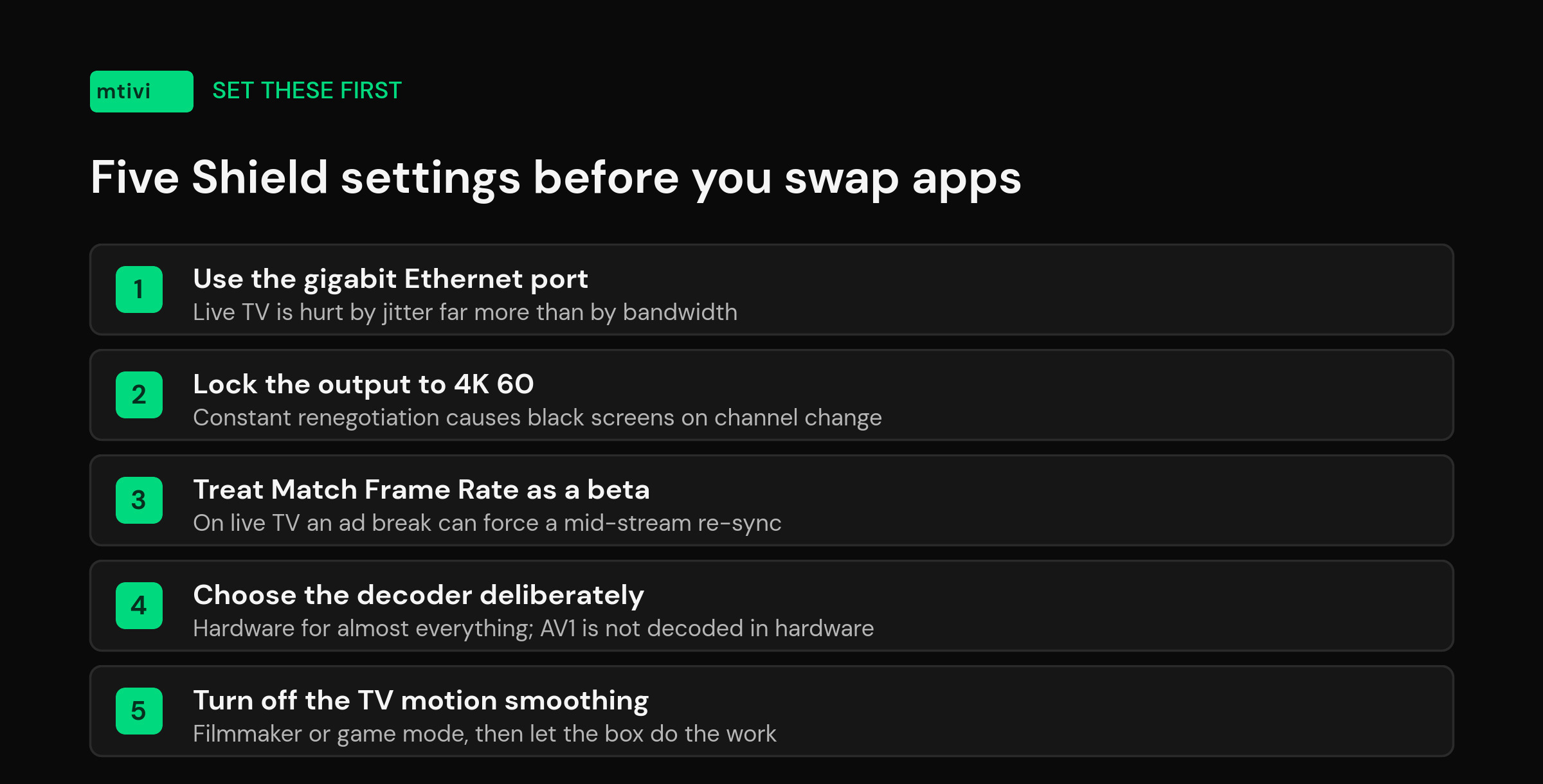
Use the Ethernet port. Gigabit wired beats good Wi-Fi for live TV every time, because live streams punish jitter far more than they punish raw bandwidth. This single change ends more buffering complaints than any player setting.
Set the display resolution manually. Leave the Shield on a fixed 4K60 output rather than letting it negotiate on every app switch. Constant renegotiation is where the black-screen-on-channel-change reports come from.
Understand Match Frame Rate before you enable it. Nvidia ships it as a beta on the 2019 Shields, and on those models you trigger it manually during playback from the settings menu rather than setting it once and forgetting it. It genuinely helps with judder on filmed material. But Nvidia’s own Match Frame Rate guidance warns that with live TV, ad breaks can arrive at a different frame rate than the program, forcing the display to re-sync mid-stream — which on a live channel looks like a stutter or a brief blackout. If your live TV hiccups every few minutes at predictable moments, turn it off and see if the pattern stops.
Pick the decoder deliberately. Hardware decoding is right for almost everything on a Shield. Software decoding is the fix for the odd channel with an unusual audio track or a codec the chip does not handle — and the honest answer for AV1 files, which the Tegra X1+ cannot decode in hardware at all. Our guide to player engines and when to switch them covers when each one wins.
Turn off the TV’s own processing. Motion smoothing, noise reduction and “enhancement” modes fight the Shield’s clean output and add lag. Game mode or filmmaker mode on the TV, then let the box do its job. If your picture looks flat or gray rather than punchy, work through the 4K HDR settings checklist before assuming the channel is bad.
What a Shield will not fix
The Shield is powerful enough that when something breaks, the box is usually innocent. A channel that stutters at 9pm and behaves at 3pm is a capacity problem upstream, not a decoding problem. A guide that will not populate is a data problem. A source that dies mid-film dies on every device you own.
The quick test costs nothing: play the same channel on a phone over mobile data. If it stutters there too, put the screwdriver down — no player and no Shield TV setting will repair a stream that is failing before it reaches your house.
And if you are choosing between a Shield and something cheaper, know what you are buying: the gap between a Shield and a budget box is not picture quality, it is what happens when you point a huge list at it. We covered the other end of that scale in our guide to players for low-end Android boxes.
Related guides
- Best IPTV Player for Android TV and Google TV
- Best IPTV Player for Large Playlists (10,000+ Channels)
- Best IPTV Player With DVR: Recording Compared
- Best IPTV Player for Subtitle Translation
- IPTV Player Cloud Sync: One Playlist, Every Device
- What Is an IPTV Player? A Clear Guide
Frequently asked questions
What is the best IPTV player for Nvidia Shield?
mtivi, for most people. It handles playlists in the tens of thousands without stalling, records on plans that only allow one connection, translates subtitles into 55+ languages on the Pro tier, and it is free to start with no account. TiviMate is the strongest alternative if what you want above all is its cable-style guide layout.
Is the Shield TV Pro worth it over the tube for IPTV?
If you have a large playlist or you want to record, yes. The Pro has 3GB of RAM against the tube’s 2GB, 16GB of storage against 8GB, and two USB 3.0 ports so you can attach a drive for recordings. The tube has a microSD slot instead. For a modest list and no recording, the tube plays exactly the same picture.
Can the Nvidia Shield handle 4K IPTV?
Comfortably. The Tegra X1+ hardware-decodes H.265/HEVC, H.264 and VP9 up to 4K at 60fps and outputs HDR10, HLG and Dolby Vision over HDMI 2.0b. If a 4K channel struggles on a Shield, the bottleneck is almost always the connection or the source rather than the box.
Does the Nvidia Shield support AV1?
Not in hardware. The Tegra X1+ has no AV1 decoder, so AV1 files fall back to software decoding or fail to play. It rarely affects live channels today but shows up in on-demand libraries. If one VOD title stutters while every live channel is perfect, suspect the codec.
Why does my Shield stutter every few minutes on live TV?
Check Match Frame Rate first. Nvidia’s own guidance notes that on live TV, ad breaks can run at a different frame rate than the program, forcing the display to re-sync mid-stream — which looks like a stutter or a short blackout. Turn it off and see whether the pattern disappears.
Should I use Wi-Fi or Ethernet on the Shield for IPTV?
Ethernet, every time. Both 2019 Shields have gigabit Ethernet. Live streams are hurt far more by jitter than by raw bandwidth, and a wired link removes the jitter. More Shield buffering threads are solved by a cable than by any app setting.
Can I record IPTV on an Nvidia Shield?
Yes, and the Pro makes it practical because you can attach a USB 3.0 drive. The bigger constraint is usually your plan rather than the box: many plans allow one connection, and most players treat recording and watching as two. mtivi records on a single-connection plan, which removes the need for a second line.
Is the Nvidia Shield still getting updates in 2026?
Yes. The Shield runs Android 11 under SHIELD Experience, and Nvidia shipped 9.2.4 with January 2026 security patches. For a streamer released in 2019 that is unusual support, and it means current Android TV players install and behave normally.
Does mtivi provide any channels or playlists?
No. mtivi is a media player. We don’t provide, sell, or include any channels, movies, series, or playlists — you add your own source. The app plays the M3U or Xtream Codes details you already have.
How many channels can a Shield actually load?
More than most players will let it. mtivi is built for very large lists, and a Pro’s 3GB of RAM gives that room to breathe. On the 2GB tube the same list loads but takes longer and is more likely to be cleared from memory when you leave the app, so you get a cold restart on your way back.
Do I need to pay to try a player on my Shield?
Not with mtivi. The free tier includes the player, the guide and playlist management, with no account required. Subtitle translation across 55+ languages sits on the Pro tier. Since playlists differ enormously, testing yours on your own Shield is the only comparison that means anything.
Will my setup transfer if I replace the Shield?
With mtivi, yes — cloud sync restores your playlists, favorites and layout on the next device, so a hardware upgrade is not a rebuild. It is worth checking before you commit to any player, because some tie activation to one device and make a move painful.