Skip to content

IPTV Smarters Authorization Failed for Above Host: What It Actually Means
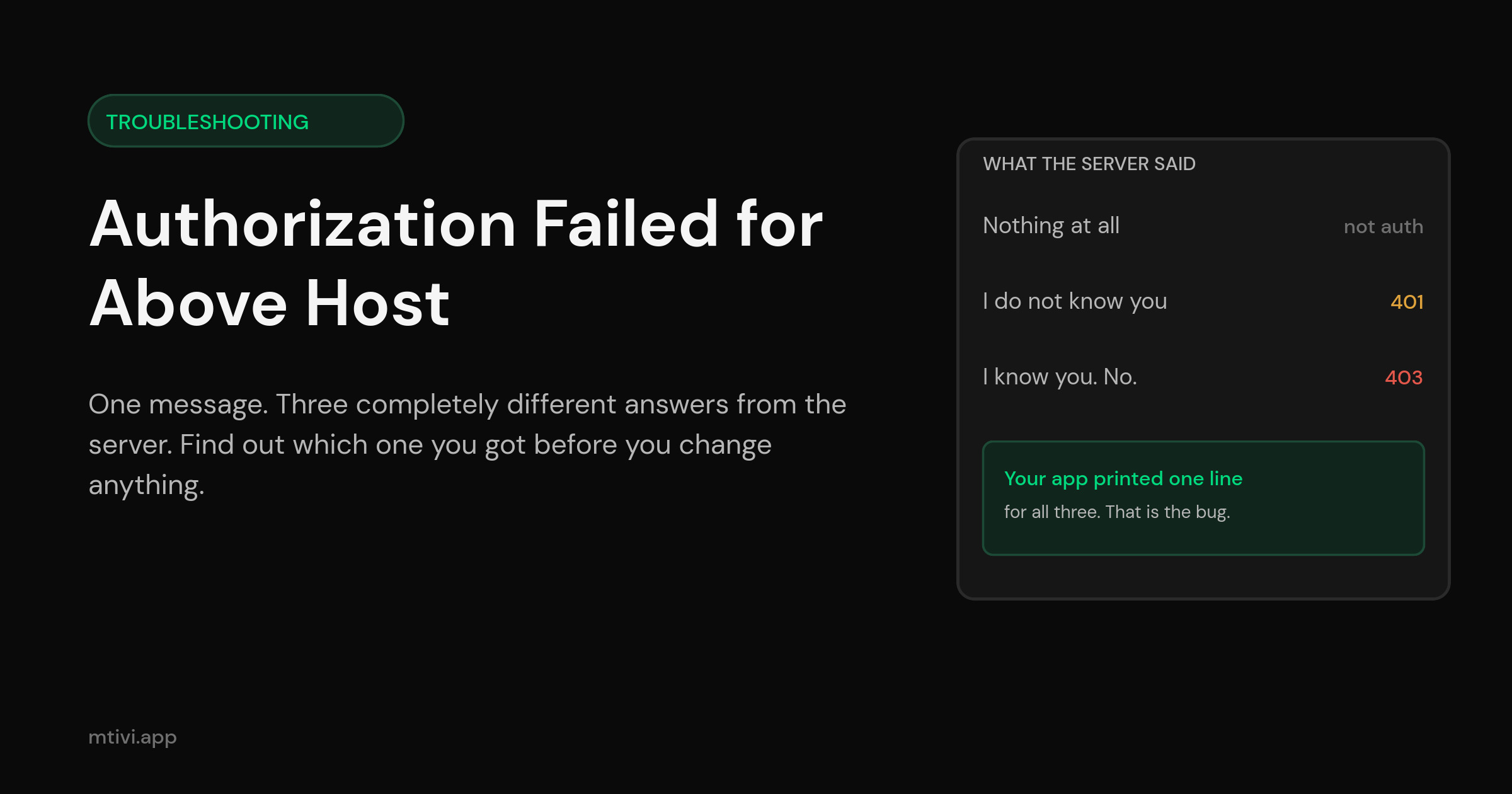
“IPTV Smarters authorization failed for above host” is not one problem. It is at least three, and the app prints the same sentence for all of them. That is why the standard advice — clear the cache, retype your details, restart the router — works for some people and does nothing at all for everyone else. They were never fixing the same thing.
The good news is that you can find out which one you hit in about a minute, without reinstalling anything, without contacting anyone, and without touching a single setting. The server already told your app exactly what was wrong. The app just did not pass the message along.
First: are you on the right page?
Login failures, playback failures and connection failures all look like “it does not work” from the sofa. They are different problems with different fixes. Find your row before you read further.
| What is happening | Where to go |
|---|---|
| You cannot get past the login screen; the app says authorization failed | This page |
| You are logged in fine, but channels will not start | Unable to play stream |
| The app never reaches a login screen at all — request failed, could not connect | Xtream request failed |
| It logs in, works for a while, then drops you back to the login screen | Player keeps logging out |
| You get a message about maximum connections | Max connections error |
Still here? Then the app got far enough to ask a question and got an answer it did not like. Let us work out what the answer was.
What “authorization failed for above host” is actually telling you
Read the message literally and it is more useful than it looks. “Above host” means the app is pointing at the server address printed above the error — it is naming the host it tried, which is a small kindness other apps do not bother with. “Authorization failed” means the conversation with that host ended badly.
What it does not tell you is how it ended badly. And there are only three ways it can, which is the entire reason this page exists.
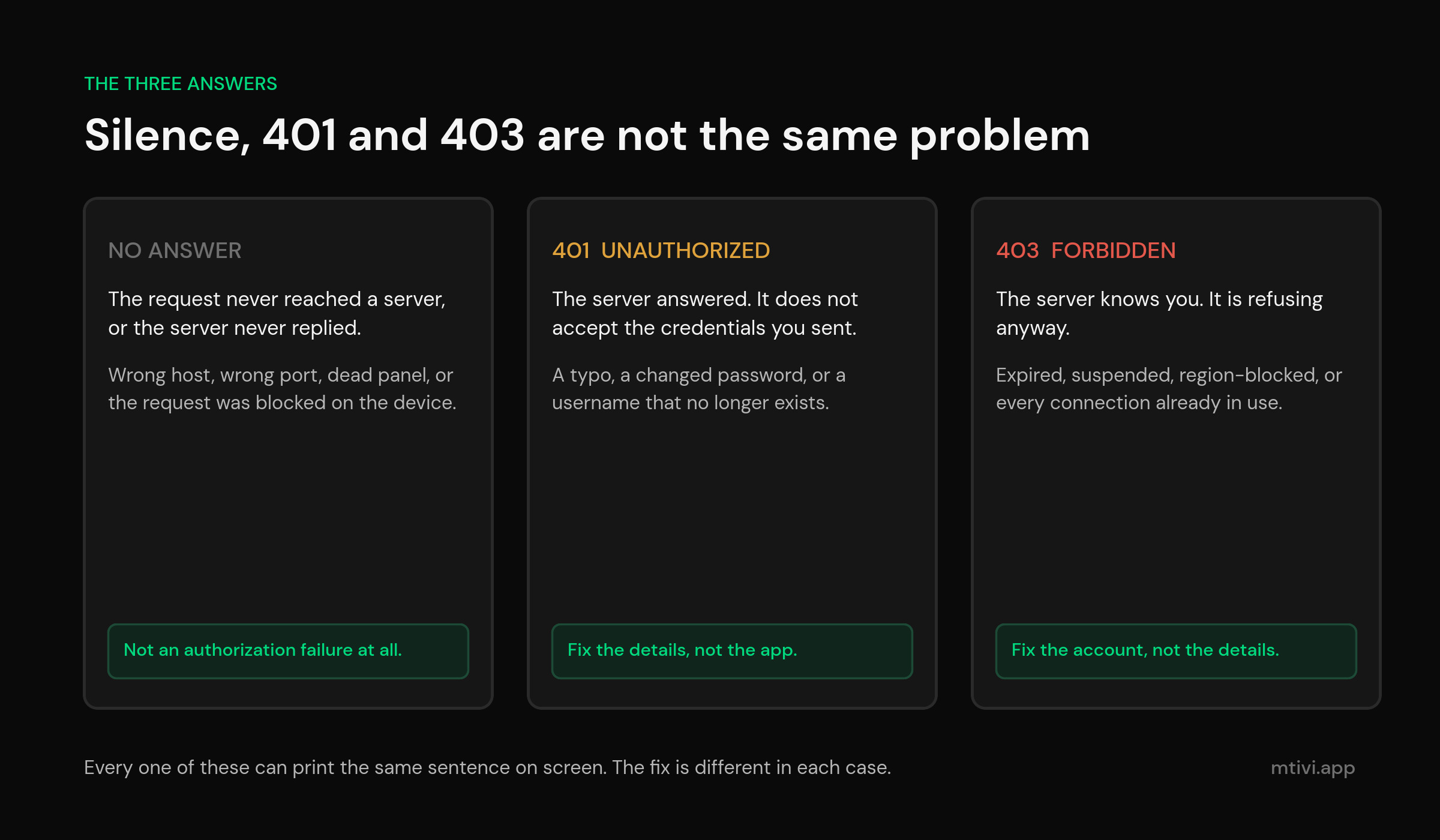
The three answers a server can give
Your player sends a login request to a web server. That is all a playlist login is — a normal web request with your username and password in it. Web servers have a standard vocabulary for saying no, and the two words in it matter enormously here.
Wikipedia’s page on the 403 status code draws the line as clearly as anyone ever has: HTTP 401 “is returned when the client has not authenticated, and implies that a successful response may be returned following valid authentication,” while HTTP 403 “is returned when the client is not permitted access to the resource despite providing authentication such as insufficient permissions of the authenticated account.” The underlying standard, RFC 9110, is blunter still. A 401 means the request “lacks valid authentication credentials for the target resource.” A 403 means “the server understood the request, but is refusing to authorize it.”
Translate that into living-room English and you get three outcomes:
- No answer at all. Nothing came back. The address was wrong, the port was closed, the panel is down, or the request never left your device. This is not an authorization failure in any meaningful sense — but the app has no other message to print, so it prints this one.
- “I do not know you.” (401) The server exists, it is listening, and it does not accept the username and password you sent. Something in the details is wrong.
- “I know you. The answer is still no.” (403) The server recognizes the account perfectly. It is refusing anyway — because the subscription lapsed, because the line was suspended, because you are outside the region it serves, or because every connection you paid for is already busy.
Those three need three completely different fixes, and two of them are not fixes you make in the app. Retyping your password twenty times will never resolve a 403.
The 60-second triage: read the answer yourself
Here is the part nobody writes about. If your provider gave you a server address, a username and a password — the three-field login most people have, which we cover in what Xtream Codes actually is — then the same login the app performs can be performed by a phone browser. And a browser shows you the whole answer instead of one sentence.
Open a browser on your phone, on the same home Wi-Fi, and go to the login address in the exact form your provider gave you. Then read what comes back:
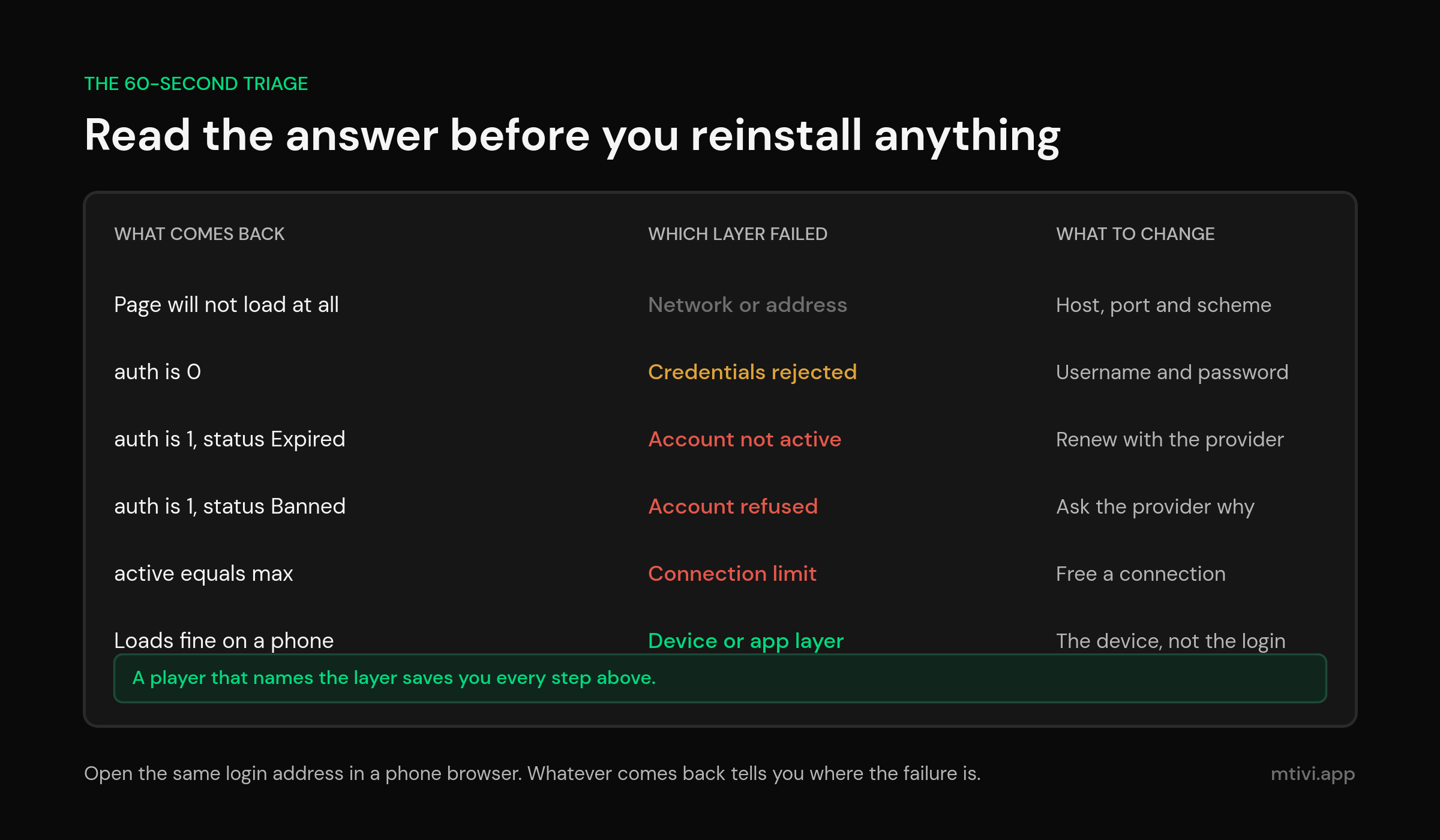
| What the browser shows | What it means | What to change |
|---|---|---|
| The page will not load at all | Nothing is answering on that address and port | The address itself, or wait out an outage |
A block of text containing "auth":0 | The server answered and rejected the credentials | Username and password |
"auth":1 with a status of Expired | Credentials are correct; the subscription is not current | Renew with your provider |
"auth":1 with a status of Banned or Disabled | The account is deliberately blocked | Ask your provider why |
| Active connections equal to the maximum | You are at your limit; this is not an authorization problem | Free a connection |
| It loads perfectly on the phone but the app still fails | The problem is on the device, not the account | The device or the app |
That last row is worth its own paragraph, because it is the most common false trail on the internet. If the login works on a phone browser and fails in the app on your TV box, nothing whatsoever is wrong with your subscription and every piece of advice about re-entering details is wasted time.
One honest limitation: this trick only works for a server-address login. If your provider handed you a single long playlist link instead, there is no login response to read — the file either downloads or it does not. We compare the two arrangements in M3U vs Xtream Codes, and this is one of the concrete reasons the three-field version is easier to live with.
Cause 1: the address is not what you think it is
This is the single largest bucket, and almost none of it is the user being careless. Server addresses get sent over messaging apps that helpfully turn them into links, copied out of emails that add invisible characters, and dictated over the phone.
A web address has a rigid shape. The scheme, then the host, then optionally a port, then a path. Wikipedia’s URI reference calls the middle part the authority — the host:port section — and it is exactly the part the error message is naming when it says “above host”. Get any piece of it wrong and you are talking to something that is not your panel:
- A missing or wrong port. Many panels answer on a non-standard port. Drop
:8080or:2095and the request goes to port 80 instead, where either nothing is listening or something unrelated is. - The wrong scheme.
http://andhttps://are different doorways. A panel that only listens on one will simply not answer on the other. - A trailing slash, or a pasted path. If your provider’s address ends in a slash and the app adds its own, you get a doubled slash that some servers reject outright. Worse, people often paste the whole thing including
/player_api.phpinto a field that expects only the host, so the app builds an address with the path in it twice. - A capital letter or a lookalike character. Hostnames tolerate case; usernames and passwords do not. And a zero pasted where the letter O belongs is invisible on a TV screen.
- A trailing space. On-screen keyboards add them constantly. It is the single most common invisible fault in every one of these fields.
Retype the address by hand from your provider’s original message rather than copying it. It takes a minute on a remote and it eliminates every item in that list at once. If typing on a remote is the part you dread, managing the playlist from a browser instead removes the remote from the process entirely.
Cause 2: the credentials are wrong in a way you cannot see
If your browser check came back with "auth":0, the server is telling you the account details do not match. That happens for reasons that have nothing to do with typing:
Providers rotate credentials. Some issue a trial line and a paid line with different usernames, and people keep using the trial one after paying. Some reset passwords after a suspected sharing incident and email the new one to an address the customer never checks. Some migrate customers between panels and issue an entirely new server address, which is why an address that worked for eight months can stop working overnight with nothing changed on your end.
There is also a quieter version: your details are correct but you are entering them into the wrong kind of field. A username-and-password login and a full playlist link are not interchangeable, and pasting one into the field meant for the other produces an authorization failure that no amount of retyping will fix.
Cause 3: the account is recognized and refused
An "auth":1 response with a status of Expired, Banned or Disabled is the server saying it knows exactly who you are and is declining anyway. This is a 403 in spirit, and it is not something an app can route around.
Expiry is the ordinary case, and it catches people because a subscription that ends at midnight does not warn you at eleven. Suspension is less common and usually follows a provider’s own rules about how many devices or locations a single line may be used from. Region blocking is the awkward one — a line sold for one country may simply refuse requests arriving from another, which is why an account that works at home can fail from a hotel and produce this exact error.
Nothing in your player fixes any of these. If you are in this bucket, close the app and message your provider with one sentence: the login returns auth 1 with a status of X. That is a far more useful support ticket than “it says authorization failed”, and it usually gets answered in one reply instead of five. A parallel case in a different app family is covered in the IBO Player Pro account expired guide, where the license and the subscription are two separate things that fail identically.
Cause 4: you are at your connection limit — which is not authorization at all
This one deserves calling out because it is genuinely mislabelled. If the login response shows your active connections matching your maximum, the server is not questioning your identity. It is telling you the seats are full.
A connection is a slot your provider sold you, and the count includes devices you think you closed. A player left on a paused channel, a box unplugged mid-stream, a second TV in another room — all of them can hold a slot until the provider’s own idle timer releases it. We take that apart properly in the max connections guide, including why pressing Home on an Android box is not the same as closing the app.
The honest arithmetic matters here: no player, mtivi included, can manufacture connections you did not buy. Switching apps will not raise the number. What a well-built player can do is stop wasting them — releasing a slot promptly when you leave a channel, and not opening a second one for background work.
Cause 5: the request never left the device
Here is the failure mode that explains the maddening case where the same login works on a phone and fails on a TV box, and it is documented by the platform itself.
Android’s network security configuration guide states the change plainly: “Up to Android 8.1 (API level 27), cleartext support is enabled by default,” and “Starting with Android 9 (API level 28), cleartext support is disabled by default.” The default configuration for apps targeting Android 9 and higher is literally <base-config cleartextTrafficPermitted="false">.
Plenty of panels are reachable only over plain http://. An app that has not explicitly opted in to cleartext traffic will have that request blocked by the operating system before it reaches the network — and the app, which never got an answer, prints an authorization failure. Same login, same credentials, different device policy, opposite outcome.
You cannot change this yourself, and you should not try. What you can do is recognize the signature: a login that works everywhere except one newer device, on an address that starts with http://. Ask your provider whether they offer an https:// address, or use a player that handles the case properly. The same class of device-side change is behind players that stop opening after an Android update.
Two smaller device-side culprits belong in the same bucket. A router or ISP resolver that cannot resolve the panel’s hostname will fail identically — try the login on mobile data with Wi-Fi off, and if it works there, the problem is your home network, not your account. And a device clock that is badly wrong will break every secure connection it attempts, because certificate validity is checked against the time the device believes it is.
The LG, Samsung and smart-TV variant
A large share of people searching this exact error are on an LG or Samsung television rather than an Android box, and their situation has an extra layer that nobody mentions.
LG’s own developer documentation explains why. A webOS app can be built as a hosted web app, where, in LG’s words, “the actual content of the app is hosted on a remote web server. So, it is composed of a local dummy app that a user will download and install on their device and a web app that actually hosts the content on the remote web server.” LG also notes the trade-off directly: “its performance depends on the quality of connection to the server.”
That architecture is exactly why so many television IPTV apps ask you to visit a website, enter your TV’s identifier and pay a one-off activation fee. On those apps there are two authorizations happening, not one: the app authorizing your television against the vendor’s server, and your playlist credentials authorizing against your provider’s server. When either fails you get a generic error, and the message will not tell you which. If your TV has stopped loading its own interface before you ever reach a playlist screen, your provider is not the problem.
Practically, that leaves smart-TV owners with fewer moving parts to control, which is why so many end up adding a small streaming box. We cover the reasoning in what actually works on LG TVs and the Samsung equivalent, and the hardware chain itself in the Android box setup guide.
The fix order that actually works
Do these in sequence. Most people are done by step three.
- Run the browser check. One minute, no changes, and it eliminates two-thirds of the possibilities immediately.
- If nothing loads: retype the address by hand — scheme, host, port, nothing else. Then try again on mobile data with Wi-Fi off to rule out your home network.
- If you see auth 0: retype the username and password by hand, watching for trailing spaces and lookalike characters. If it still fails, ask your provider whether the line was reissued.
- If you see auth 1 with a status: stop touching the app. Message your provider and quote the status word.
- If connections are at the maximum: turn off every other device that touches the line, wait several minutes for the slots to release, and try once more.
- If it works in a browser but not in the app: the account is fine. Clear the app’s cache, restart the device, and check whether the address is
http://on a newer device. - Only then consider reinstalling — and take a copy of your setup first, so a reinstall does not cost you your channel list.
That last point is not a footnote. Reinstalling is the step most guides put first, and it is the one that loses people their favorites and groups, as the favorites guide explains in detail. Back up your setup before you go near it.
What a better error message looks like
Every cause on this page is knowable at the moment it happens. The server said which one it was. The player chose to compress five distinct outcomes into one sentence, and that single design decision is responsible for a remarkable amount of wasted evening.
This is the gap mtivi was built to close. When a login fails, the app tells you what came back rather than printing a generic line — whether the address never answered, whether the credentials were rejected, or whether the account was recognized and refused. Naming the layer turns a support ticket into a thirty-second fix.
The second half matters just as much. Cloud sync means your channel list, favorites and groups live with your account rather than with one installation, so if you do end up re-adding a playlist, you are re-entering three fields and nothing else. That is the difference between a bad evening and a bad minute, and it is the same reasoning behind syncing your setup across devices and moving to a new box without starting over.
None of that is a claim about your subscription. A player cannot renew an expired line, unban an account, or create connections you did not buy. What it can do is stop you spending an hour on the wrong problem, load a very large playlist without complaint once you are in, pull in a full guide, and translate subtitles on channels in a language you do not read. If you are weighing up apps rather than fixing one, the three-way comparison and the Android TV rankings are the places to start. And if you are earlier in the process than that, what an IPTV player is covers the ground from the beginning.
Related guides
- Unable to play stream — when you are logged in and channels still will not start
- Xtream request failed — when the app never reaches a login answer at all
- Max connections error — what a connection really is and how to free one
- Player keeps logging out — logins that work and then quietly stop
- What is Xtream Codes? — the three login fields, explained
- M3U vs Xtream Codes — which login format to ask your provider for
- IBO Player Pro account expired — when the license and the subscription fail identically
- Back up your player setup — before you reinstall anything
- Best IPTV player for LG TV — the webOS situation in full
- What is an IPTV player? — the top-level explainer
The message is vague. The cause is not. Spend the minute reading the answer your server already gave you, and the fix stops being a guessing game.
Frequently asked questions
What does authorization failed for above host mean in IPTV Smarters?
It means the app sent a login request to the server address shown above the error, and that conversation ended badly. It does not say how. The server may have rejected your credentials, recognized your account and refused it anyway, or never answered at all. All three print the same sentence.
Does authorization failed mean my subscription expired?
Sometimes, but not usually. Expiry is one of several causes. A wrong port in the server address, a trailing space in the username, a full connection limit and a device-side block on plain HTTP all produce the identical message. Check the login response in a phone browser before assuming you need to renew.
How do I tell a wrong password from an expired account?
Open the same login address in a phone browser. A response containing auth 0 means the credentials were rejected. A response containing auth 1 alongside a status such as Expired or Banned means the credentials were accepted and the account was refused. Those are two different problems with two different fixes.
Why does it work on my phone but not on my TV box?
Because the failure is on the device, not the account. The most common reason is that the panel is reachable only over plain HTTP, and newer Android versions block unencrypted traffic by default unless an app explicitly opts in. A wrong device clock or a router that cannot resolve the hostname produces the same split.
Can clearing the cache fix an authorization error?
Occasionally, when the app has cached a stale login response or a redirect. It is worth one try and takes seconds. But it cannot fix a wrong address, an expired line or a full connection limit, which is why it is step six on this page rather than step one.
Why does the same login work on one TV and fail on another?
Different devices apply different rules to the same request. Operating system version, network policy, DNS resolver and system clock all vary between devices. If one screen logs in and another does not, compare those before you touch the account details.
Is a trailing slash in the server URL really a problem?
It can be. If the address you enter ends in a slash and the app appends its own path, some servers reject the doubled slash outright. Enter the scheme, host and port only, with nothing after them, unless your provider explicitly told you otherwise.
What is the difference between a 401 and a 403 here?
A 401 means the server does not accept the credentials you sent and a valid set might work. A 403 means the server understood the request and is refusing to authorize it regardless — the account is known and blocked. Retyping your password addresses the first and can never address the second.
Does a VPN cause authorization failed?
It can, in both directions. Some lines are sold for one region and refuse requests arriving from another, so a VPN endpoint in the wrong country will produce a refusal. Equally, some networks block the panel and a VPN restores access. If you use one, test the login with it off and on and note which works.
Do I need to contact my provider?
Only if the browser check shows auth 1 with a status word, or shows your connections at the maximum. In those two cases nothing in the app will help. Quote the status word in your message — it turns a vague complaint into something the provider can act on immediately.
Will switching players fix this error?
Not if the cause is your account, your address or your connection limit — those follow you to any app. A different player helps when the cause is the app itself: a device-side block on plain HTTP, a stale cached session, or an error message too vague to act on. Work out which bucket you are in first.
Does mtivi provide the channels I am trying to log in to?
No. mtivi is a media player. We don’t provide, sell, or include any channels, movies, series, or playlists. You add your own source, and the login details you are troubleshooting come from whoever supplies that source.
Will reinstalling the app lose my favorites?
In most players, yes — favorites and group ordering are stored on the device. That is why reinstalling belongs at the end of the list, not the start. Take a copy of your setup first, or use a player that keeps your list with your account rather than with one installation.