Skip to content
What Is EPG in IPTV? The TV Guide, Explained
What is EPG in IPTV? EPG stands for electronic program guide, the on-screen schedule that shows what is on now, what is coming next, and the full line-up across every channel in your playlist. It is the layer that turns a bare list of channel names into something that behaves like a real television guide.
If you have ever opened a player, scrolled a wall of channels, and wondered why there is no “what is on” information beside each one, you have met the gap an EPG fills. The channels play fine, but without guide data the app has no idea what is airing or when. This guide explains what EPG in IPTV means, where the data comes from, how a player turns it into the grid you see, why guides so often show up empty or wrong, and what a fully populated guide actually lets you do. None of it requires you to be technical. Once you can picture the moving parts, the whole thing stops being mysterious.
What is EPG in IPTV, in one sentence?
An EPG is a schedule of programs, delivered as data, that your player lays over your channel list so each channel shows its current and upcoming shows. The term comes straight from broadcast television: the electronic program guide is the digital successor to the printed TV listings that used to arrive in newspapers. On IPTV it does the same job, only it is fetched over the internet and refreshes on its own. Crucially, the guide is separate from the channels. Your playlist provides the streams; the EPG provides the story of what is playing on them. Keep those two things apart in your head and almost every EPG question answers itself.
IPTV EPG meaning: the data behind the grid
When people ask about IPTV EPG meaning, they are usually picturing the grid on screen, but the grid is just the visible end of a small pipeline. Behind it sits a schedule file. In the IPTV world that file is almost always in XMLTV format, an open standard that has been the de facto way to describe TV schedules since the late 1990s. An XMLTV file has two halves: a list of channels, each with a unique id, and a long list of programs, each stamped with a start time, an end time, the channel id it belongs to, a title, and usually a short description. Some entries also carry a category, an episode number, an age rating, or a small poster image. That is the raw material of every guide you have ever scrolled.
This is also why guide data is described as electronic program guide IPTV data rather than part of the stream itself. The video and the schedule travel separately. A provider might hand you a playlist link and, alongside it, an EPG URL, a web address that points to the XMLTV file. The player fetches both: the playlist to know which channels exist, and the EPG to know what is on them.
How EPG works in an IPTV player
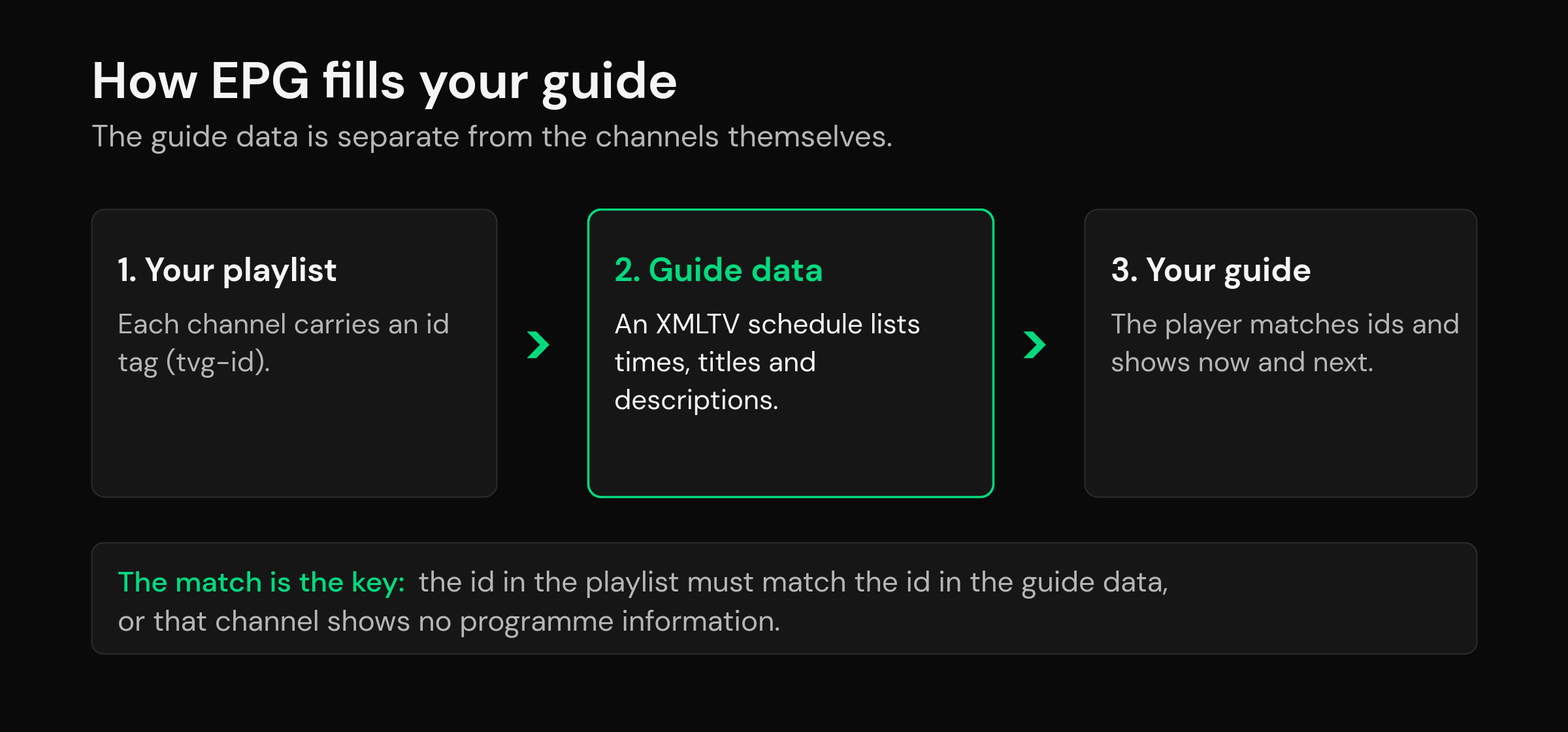
Here is how EPG works in IPTV, step by step. First, every channel in your playlist carries a small tag called a tvg-id. Think of it as the channel’s fingerprint. Second, the XMLTV guide file lists its programs against channel ids of its own. Third, the player tries to match each playlist tvg-id to a channel id in the guide. When the two line up, the programs slot into place and that channel shows now, next and the hours ahead. When they do not line up, the channel still plays perfectly, but it sits there with no information beside it.
That matching step is the single most important thing to understand about EPG, because it explains nearly every guide problem. The player is not losing the data; it simply cannot connect a channel to its schedule because the two ids disagree. A good player makes this forgiving. It will match loosely, let you correct a mismatch by hand, and accept extra guide sources so gaps can be filled, but the underlying logic is always the same: the id in the playlist meets the id in the guide, and the program appears.
What a full guide unlocks: now, next, catch-up and reminders
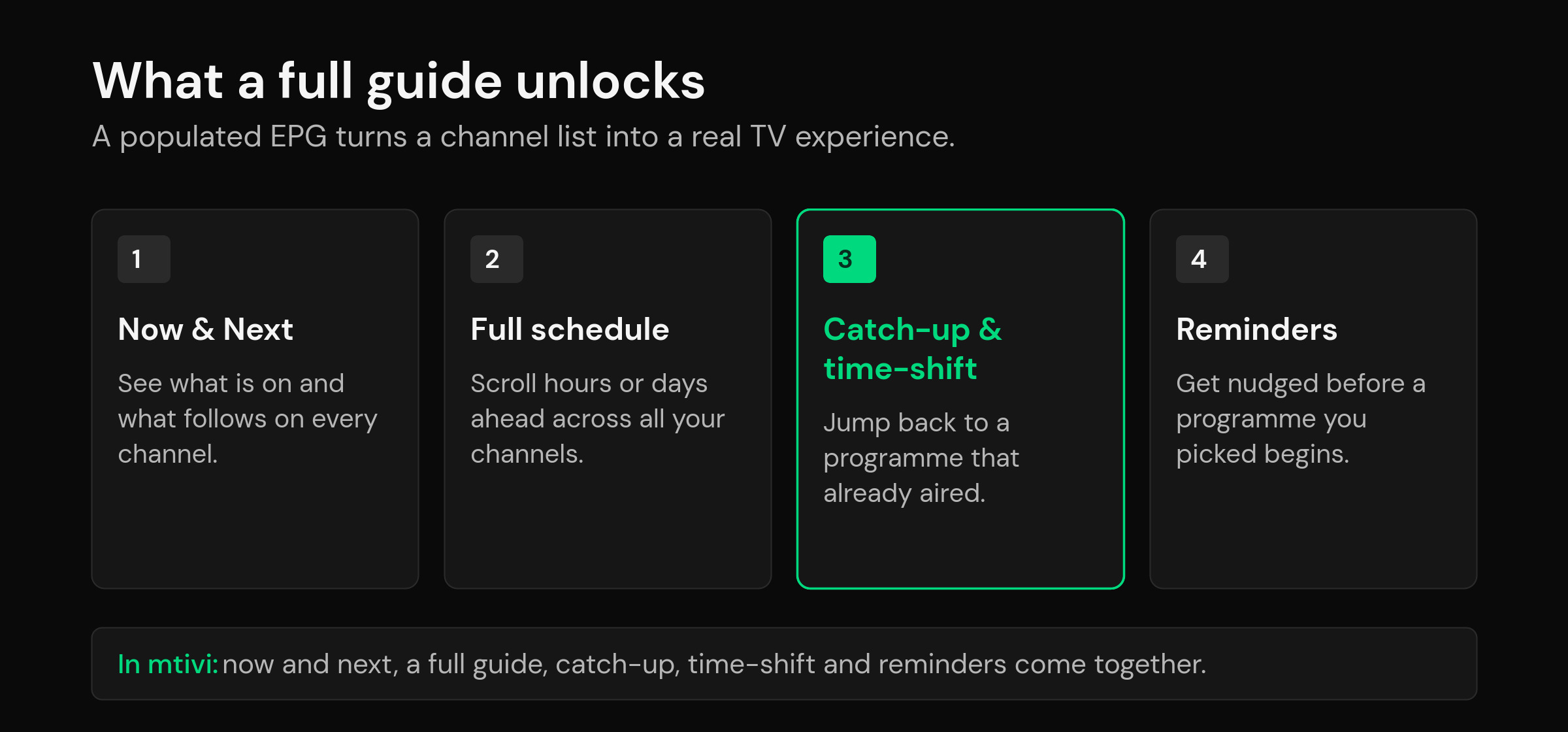
A populated EPG is not just decoration. It is what turns a channel list into a television experience, and several of the features people value most depend on it entirely. With real guide data in place you get an at-a-glance now and next on every channel, a full grid you can scroll hours or even days ahead, and search that can find a program by name instead of forcing you to remember a channel number.
The guide also powers the time features. Catch-up and time-shift, the ability to jump back to a program that has already aired where your source supports it, rely on the EPG to know exactly when each show started and stopped. Reminders work the same way: because the guide knows a program begins at a set time, the player can nudge you shortly before it starts. Recording to a schedule leans on the same timing. Without the EPG, none of these have anything to anchor to. This is why a strong guide is worth the small effort of setting it up, and it is exactly the payoff mtivi is built around.
Why your IPTV guide is empty, wrong or half-filled
Most guide complaints fall into a handful of buckets, and all of them trace back to the pipeline above. An entirely empty guide usually means no EPG source has been added yet, or the EPG URL is wrong or offline. A guide that is filled for some channels but blank for others is the classic tvg-id mismatch: those blank channels simply did not find their match in the schedule file. Times that are shifted by a few hours point to a timezone offset between the guide data and your device. A guide that looked fine yesterday and is empty today often means the schedule file only carries a day or two of data and needs to refresh. None of these mean your player is broken; they are all fixable once you know which part of the chain slipped. If you want the hands-on version, our companion walkthrough covers how to set up your EPG step by step, including how to fix mismatches and time offsets.
It also helps to know the shape of your source. Whether you are loading a plain playlist link or a login, the way guide data attaches can differ slightly, which is worth understanding when you compare M3U vs Xtream Codes. And because the guide is just data, it can follow you: with cloud sync that carries your playlist and favorites across devices, the guide you set up on one screen shows up ready on the next.
EPG in mtivi: a guide that just works
mtivi treats the guide as a first-class part of watching, not an afterthought. Add your source, point it at your guide data, and mtivi builds a full electronic program guide with now and next on every channel, a scrollable grid for the days ahead, and search that reaches into the schedule. From there the time features come alive: catch-up and time-shift where your source offers them, and reminders so you never miss a program you were waiting for. Because mtivi is a media player, it supplies none of the channels or schedules itself; you bring your own source, and mtivi turns it into a clean, complete guide. If you are still deciding whether a dedicated app is for you, it helps to first understand what an IPTV player is and how the guide fits into the bigger picture.
Related guides
- IPTV EPG Setup: Get a Full TV Guide With Now/Next, Catch-Up and Time-Shift
- What Is an IPTV Player? A Clear Guide for 2026
- M3U vs Xtream Codes: Which IPTV Format Should You Use?
- IPTV Player Cloud Sync: Watch the Same Playlist on Every Device
Frequently asked questions about EPG in IPTV
What does EPG stand for in IPTV?
EPG stands for electronic program guide (also spelled program guide). In IPTV it is the on-screen schedule that shows what is playing now, what is on next, and the full line-up across your channels, exactly like the TV listings that used to be printed in newspapers.
What is EPG in IPTV in simple terms?
It is the data that fills your channel guide. Your playlist provides the channels; the EPG provides the schedule of programs on them. The player lays that schedule over your channels so each one shows its current and upcoming shows.
Where does IPTV EPG data come from?
From a separate schedule file, usually pointed to by an EPG URL that your provider supplies alongside the playlist. The player downloads that file and reads the program times and titles from it. The guide is not part of the video stream; it travels as its own data.
What is XMLTV and how does it relate to EPG?
XMLTV is the open file format most IPTV guide data uses. It lists channels with unique ids and programs with start times, end times, titles and descriptions. When people talk about an EPG file for IPTV, they almost always mean an XMLTV file.
What is a tvg-id and why does it matter?
A tvg-id is a small tag on each channel in your playlist that acts as its identifier. The player matches that id to a channel id in the guide data. If the two match, programs appear; if they do not, that channel shows no guide information even though it plays normally.
Why is my IPTV EPG empty or not showing?
Usually because no guide source has been added, the EPG URL is wrong or offline, or the channel ids in your playlist do not match the ids in the guide file. Adding a valid EPG source and correcting id mismatches fixes the great majority of blank guides.
Why is my EPG showing the wrong time?
That is a timezone offset between the guide data and your device. The program names are correct but shifted by a fixed number of hours. Most players let you apply a time offset to the EPG so the schedule lines up with your local time.
Do I need an EPG to watch IPTV?
No. Channels play without one. But without an EPG you get no now and next, no scrollable guide, no reminders and no schedule-based recording. The EPG is what makes a channel list feel like real television rather than a plain list of links.
Is EPG the same as catch-up or time-shift?
Not quite. Catch-up and time-shift are features that let you go back to a program that already aired, and they rely on the EPG to know exactly when each show started and stopped. The EPG is the schedule; catch-up and time-shift are things you can do because that schedule exists.
Can I add my own EPG source?
Yes. A capable player lets you add one or more guide sources by URL and even correct id matches by hand, so you can fill gaps or replace weak guide data with a better source for the same channels.
Does mtivi include channels or a guide of its own?
No. mtivi is a media player. We don’t provide, sell, or include any channels, movies, series, or playlists, and you add your own source. The same applies to the guide: mtivi displays the EPG data your source provides and does not supply schedules of its own.
How often does the EPG update?
It depends on the source. Many guide files carry a day or two of schedule at a time and are refreshed by the player on a regular cycle. If your guide empties out after a day, the source is short and the player simply needs to fetch the latest file again.